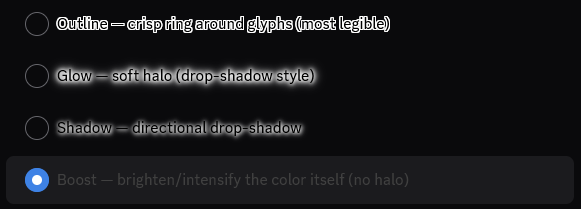
ReadableRoleColors adds a readability effect when role-colored text has too little contrast against its background. Outline, Glow, and Shadow preserve the text’s color and add a contrasting edge or halo. Boost changes the rendered color instead.
Download ReadableRoleColors.plugin.js · Source on GitHub
Behavior
The plugin looks for inline role colors and text-clipped gradients in Discord usernames, messages, voice names, typing indicators, mentions (including the editor), the account area, audit-log users, member-group headers, profile nicknames, and bot tags. These surfaces match the coloring paths in MoreRoleColors 2.0.100. Outside the member list, Apply everywhere must be on. It compares the foreground with the resolved background using the WCAG contrast-ratio formula and applies the selected effect only when that ratio is below the configured threshold. Colors already at or above the threshold remain unchanged.
For outlines and halos, it chooses black or white according to which contrasts more with the text color. For Boost, it lightens colors on dark backgrounds and darkens them on light backgrounds. Boost uses a filter that also affects any nested emoji or images.
The same detection supports output from MoreRoleColors without a separate integration setting. Gradients take precedence over fallback text colors. The contrast calculation uses the first supported hex or RGB color in the computed gradient, falling back to Discord’s --custom-gradient-color-1, rather than measuring every gradient stop. Mentions also support computed foreground colors because Discord renders their role-color properties through CSS.
The plugin watches newly added elements and changes to inline styles or classes. It styles the innermost colored element to avoid stacking effects on both a name and its wrapper. Glow and Shadow use drop-shadow filters on text-only block-like elements and fall back to text shadows for inline or media-containing elements.
Coverage depends on Discord’s CSS classes, message-content IDs, and on how Discord or another plugin renders the text. Outside mentions, text without an explicit inline color or text-clipped gradient is ignored. BetterDiscord containers, ordinary links and buttons within messages, code blocks, blockquotes, underlined or struck-through text, spoilers, and elements containing excluded content are skipped. Mentions are supported even when interactive. Apply everywhere expands the search area; these exclusions still apply.
Settings
Open User Settings → BetterDiscord → Plugins and open the settings for ReadableRoleColors.
| Setting | Default | Behavior |
|---|---|---|
| Readability effect | Outline | Select the effect described below. |
| Effect strength | 1 | Range 0.5–3, in steps of 0.1. Controls outline thickness, halo spread, or how strongly Boost changes the color. |
| Apply everywhere | On | Searches throughout the interface for supported colored text. When off, the member-list setting controls the remaining scope. |
| Apply in member list | On | Used only when Apply everywhere is off. If both switches are off, the plugin clears its effects. |
| Contrast threshold | 2 | Range 1–3, in steps of 0.01. Only colors below this ratio receive an effect. A threshold of 1 leaves colors unchanged because contrast ratios cannot be lower than 1. |
The available effects are:
- Outline — a crisp ring around the glyphs.
- Glow — a soft halo around the text.
- Shadow — a tight halo with a directional shadow.
- Boost — lightens or darkens the rendered color without adding a halo.